Class prep · TJ Computer Vision

Read the pixel.Then apply the rule.

An independent course in computer vision. Practice pixels, correlation, smoothing, components, Sobel edges, patch matching, integer shifts and stereo depth, and check every result by hand. Every problem has a full worked solution. Built by Neil Kothari, a TJ alumnus.

$395 covers the full school year. The first lesson is free.

Try one. This is a test-level question from the course.

Problem 1

  • Test level
  • Multiple choice
  • No calculator
  • 4 pts

A small image has 4 rows and 3 columns. Its column sums are 11, 14 and 9. Three of its row sums are 8, 10 and 7. What is the fourth row sum?

Choose one answer

original problems, each with a worked answer
624
original problems, each with a worked answer
at test level or beyond
432
at test level or beyond
short lessons, one for every topic
48
short lessons, one for every topic
units, all open now
8
units, all open now

Free lesson

Lesson 1.1: A pixel is a number at a row and a column

A gray image is a grid of numbers, and you find any one of them by its row and its column.

Start with one intensity at a row and a column. The next lessons keep that address and put a kernel on it.

Start with a question

Take a photo on your phone and keep zooming in. At some point the picture stops looking smooth. You see tiny squares, each one a single flat shade. Those squares are pixels (short for "picture elements").

Here is the question this lesson answers: what does the computer actually store for each of those squares, and how does it find one of them?

The answer is surprisingly small. In a gray image, each pixel is one number, and the computer finds it by two counts: how far down (the row) and how far across (the column). Every program in computer vision, from a face filter to a self-driving car, starts by reading numbers this way. If you can read one pixel correctly, you can build everything else in this course.

By the end of this lesson you will be able to:

  1. Explain what a pixel's number means and why a gray image is a grid of numbers.
  2. Read the value at row rr and column cc, with row 0 at the top and column 0 at the left.
  3. Find an image's width and height, and add up one row or one column.
  4. Find the brightest and darkest value in an image without falling for the max(image) trap.
  5. Turn a row and column into a single position number, the row major index.

What a pixel is

A pixel is one small square of an image. In a grayscale (black and white) image, each pixel stores one number called its intensity. Intensity means "how bright."

  • A small number is dark.
  • A big number is bright.

In this course the numbers run from 0 (black) to 9 (white), so the grids stay easy to read. Real cameras usually use 0 to 255, but the idea is exactly the same: bigger means brighter.

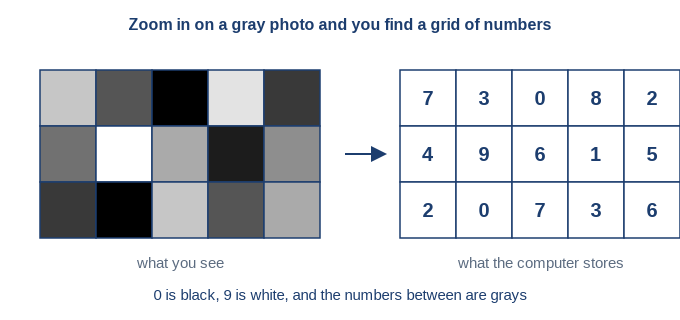
A 3 by 5 patch of gray squares next to the same patch written as numbers, where 0 is black and 9 is white

The left side of the figure is what your eyes see. The right side is what the computer stores. They are the same image. The black square holds 0, the white square holds 9, and the grays hold the numbers in between.

One number, not three. A color photo stores three numbers per pixel (red, green and blue). This unit has no color channels. Every pixel is a single intensity, so "the value of a pixel" always means one number.

Problem 2

  • Core
  • True or false
  • No calculator
  • 2 pts

A thermal camera stores a small frame as a list of rows called thermal. Row 0 is the top row and column 0 is the left column.

col 0col 1col 2col 3
row 02581
row 16037
row 24952

True or false: thermal[2][1] means column 2, row 1, so it returns 3.

Is the statement true or false?

Problem 3

  • Core
  • Multiple choice
  • No calculator
  • 4 pts

A satellite tile is stored as

tile = [
    [4, 9, 1],
    [6, 2, 8],
    [6, 3, 0],
]

A student wants the brightest pixel value and runs print(max(tile)). What does Python print?

Choose one answer

Open the rest of this lesson, free

The full lesson and all 13 of its problems, with every worked answer.

I am aI am a

Your free lesson opens right here, on this device for 30 days. We'll email you occasional TJ class prep updates. Unsubscribe anytime.

How it works

Class prep that works alongside class

A complete computer vision course for students taking Computer Vision at TJ. Work alongside class or study the material in sequence. Each lesson states a rule, runs it on a small grid, and shows the check before you try the practice.

  • Original problems in several formats: true or false, multiple choice, multi-part and free response.
  • Each one is marked core, test level or beyond.
  • Pixels, correlation without a kernel flip, smoothing, components, Sobel edges, patch scores, integer shifts and stereo depth.
  • A worked answer for every problem, ending with the mistake that most often costs points.
  • Zero padding, divide after the sum, 4-connected components, L1 magnitude, SAD, SSD and a disparity of zero left undefined.

What is inside

  1. 1Pixels and coordinates6 lessons · 78 problems
  2. 2Cross correlation6 lessons · 78 problems
  3. 3Smoothing and sharpening6 lessons · 78 problems
  4. 4Thresholds and components6 lessons · 78 problems
  5. 5Sobel edges6 lessons · 78 problems
  6. 6Patch matching6 lessons · 78 problems
  7. 7Motion as a shift6 lessons · 78 problems
  8. 8Stereo disparity and depth6 lessons · 78 problems
The front entrance of Thomas Jefferson High School for Science and Technology
Neil Kothari, co-founder of EduAvenues

Who built it

Neil Kothari

TJHSST alumnus · Co-founder, EduAvenues · 10+ years in TJ preparation

Neil is a TJ alumnus and has spent more than a decade working with TJ students and their families. He built this course so a student can run a vision rule on a small grid and check the result by hand. Every problem is written for the course and every answer is checked before it goes in.

Tuition

$395for the full school year

One tuition covers every unit of the course. All 8 units are open now. The A pixel is a number at a row and a column lesson stays free for everyone.

  • All 8 units: 48 lessons and 624 original problems
  • A worked answer for every problem
  • Access through the end of the school year
Enroll